Why CAPTCHAs Don't Stop Contact Form Spam
You add a CAPTCHA to your contact form. The spam keeps coming. Sound familiar? CAPTCHAs solve one narrow problem — automated bots — but most contact-form noise today is human-written cold outreach, and no CAPTCHA can stop a person from filling out a form.
What CAPTCHAs actually block
A CAPTCHA (Completely Automated Public Turing test to tell Computers and Humans Apart) is designed to verify that a form is being submitted by a human, not a script. That works for:
- Automated bots filling forms at scale
- Credential-stuffing scripts that cycle through common inputs
- Comment spam bots posting identical messages across thousands of sites
For those cases, CAPTCHAs help. The problem is that these are no longer the main source of contact-form noise for most indie hackers and small teams.
The real spam problem: human-written outreach
After you launch and share your project publicly, a different kind of message floods your inbox:
- SEO agencies offering to "rank your site"
- Freelancers pitching design, development, or copywriting services
- Link-building requests
- Cold sales emails disguised as inquiries ("I love what you're building — we should talk")
Every one of these passes a CAPTCHA effortlessly, because a real person typed it. A CAPTCHA cannot evaluate intent — it can only tell you a human was present.
For solo founders and small teams, human cold outreach is often the majority of form submissions, not the minority. That means CAPTCHAs leave the core problem entirely unsolved. For a closer look at why this hits indie hackers particularly hard, see Why contact form spam hits indie hackers so hard.
Why form-level filters fall short too
Some form builders and plugins offer basic spam filters — keyword blockers, IP blockers, or integration with services like Akismet. These are better than nothing, but they have hard limits:
- Keyword lists go stale — Sales reps adjust their language constantly.
- Tied to one platform — A filter in Contact Form 7 does nothing if you also use a Typeform, a Webflow form, or a custom HTML form on another page.
- No intent analysis — Blocking the word "SEO" will also block a genuine message from a user asking about SEO implications of your product.
The fundamental issue is that form-level tools can only act on the raw text at the moment of submission. They have no broader context for what makes a message legitimate.
Filtering at the email layer: a better model
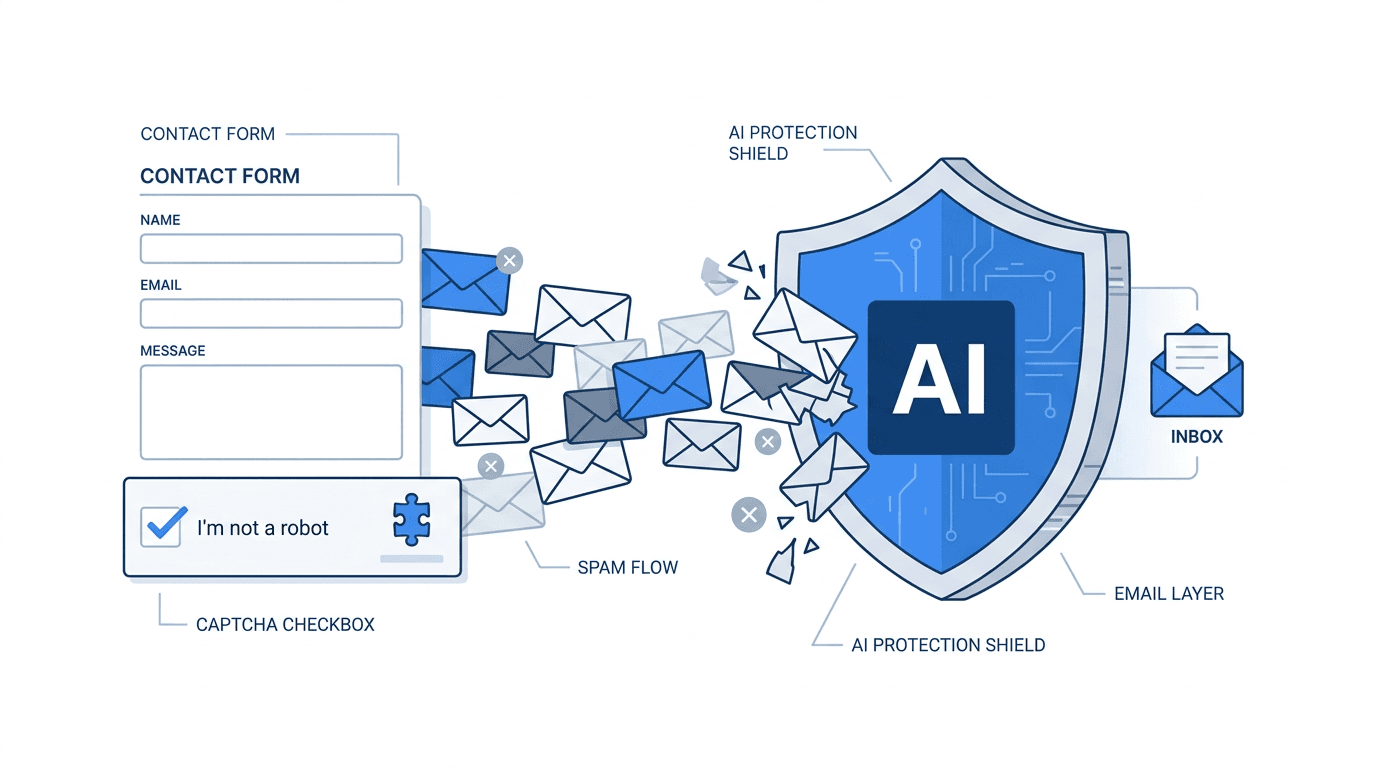
A different approach is to shift filtering from the form to the email layer — the point where your form's notification email arrives in your inbox.
Here is how it works in practice:
- Instead of routing form submissions directly to your personal inbox, you route them to a dedicated filter address.
- Each incoming message is analyzed by an AI model that evaluates the full text — subject, body, intent — not just a keyword match.
- Messages classified as legitimate are forwarded to your real inbox. Spam and cold outreach are blocked and stored in a review dashboard.
Because filtering happens after submission and before your inbox, it works regardless of which form builder you use. You only change one thing: the "send notifications to" email address in your form settings.
What this means in practice
Consider a few real scenarios:
Webflow form: You change the notification email in Webflow's form settings to your filter address. No Webflow plugin or embed change needed.
Contact Form 7 on WordPress: Same — you update the admin email target, not the form code. For a complete walkthrough of the exact steps, see How to connect Contact Form 7 to formpuppy.
Custom HTML form: Your backend sends a notification email. Point it at the filter address instead of your inbox.
Typeform, Notion form, Airtable form: Any tool that emails you on submission works the same way.
The filter does not care about the source. It only sees the email that arrives.
Frequently Asked Questions
Does this approach still require a CAPTCHA?
No, but you can keep one if you want. Email-level filtering and CAPTCHAs address different problems and can coexist. CAPTCHAs reduce automated bot volume; email-level AI filtering catches human-written spam and cold outreach. Many teams drop the CAPTCHA after setting up email filtering to reduce friction for real users.
What if the AI incorrectly blocks a real message?
Legitimate messages that get flagged as spam are called false positives. A good email filter stores blocked messages in a dashboard where you can review and recover them. You can also mark false positives as legitimate, which improves classification over time.
Does the AI understand different languages, including Japanese?
It depends on the service. Some AI filters are trained specifically on multilingual contact-form content. For teams that receive Japanese-language inquiries alongside English ones, multilingual support is worth checking before you commit to a tool.
How long does setup take?
For most forms, setup takes under five minutes: sign up for a filtering service, get your dedicated address, and update the notification email in your form settings. There is no code to write, no plugin to install, and no deployment step. The change takes effect immediately — the next submission your form receives goes through the filter.
Summary
CAPTCHAs block bots but cannot evaluate intent. Most contact-form spam today is human-written cold outreach — and it sails through any CAPTCHA unchecked. Email-level AI filtering solves the problem that form-level tools miss: it analyzes the full content of every submission, filters by intent, and only forwards real leads to your inbox — regardless of which form builder you use.
formpuppy evaluates the intent of every submission — not just whether a human was present — and forwards only genuine inquiries to your inbox. No code changes, no CAPTCHA friction for real users.